Signal Locked the Door on Your Own AI Assistant
On 19 November Google let Gemini drive your Mac. The next day Signal switched on blocks to stop AI assistants from reading your chats. The real question is who gets to see your screen.
Picture this: you ask your AI assistant to fill in a shipping quote from three PDFs on your laptop. It opens a quiet window in the background, clicks through the files, fills in every box, and asks you to approve before it submits anything. Your cursor never moves. You go and make coffee. It is the dream we were promised.
Now picture the same assistant, with the same eyes, scrolling past your private group chat on its way to those PDFs.
That was the week. On 19 November Google shipped the first picture. On 20 November Signal tried to make the second one impossible.
The gift: an assistant that drives your Mac
Google announced that "computer use in the Gemini app for Mac helps you get multi-step tasks done across your local files, desktop apps, and the web." Gemini "works inside an isolated background window with a live preview right in your chat," so your main screen and cursor stay free. Google's examples are pleasantly boring: filling multi-box shipping quotes from local PDFs, building a Google Slides deck from live dashboards, staging resale listings.
The controls are real. In Google's words, "you choose which apps Gemini can access, watch every step live, pause at any time, and approve key actions before they happen." For now it is limited to English in the US, on Apple Silicon Macs running macOS Sequoia 15.0 or later, for personal Google accounts held by people 18 and over on the AI Plus, Pro and Ultra plans.
Look at what those controls actually are, though: a list of apps the assistant may touch, plus a human watching. It is like handing a teenager your car keys and riding in the passenger seat. It works fine as long as you never glance at your phone.
The door: Signal says not in here
A day later, Reuters reported that Signal "would restrict screenshots to stop AI agents from reading private chats on phones," with the new blocks switched on by default. If Signal detects a screenshot attempt or an assistant trying to read the screen, a pop-up offers to turn the protection off.
Signal did not sound triumphant about it. It called its own protections "incomplete." It named operating-system assistants, Apple's Siri AI and Google's Gemini Intelligence, as the main worry, and called agentic integrations "an existential threat to Signal." It also said it cannot reliably offer the protection on macOS, which happens to be the platform Gemini just learned to drive. Signal asked Apple, Google and Microsoft for a straightforward way for apps to opt out of screen reading, notifications and file access by assistants.
There is a backstory. Earlier that week Reuters reported that Meta's Muse had used macOS accessibility and screenshot tools to read Signal chats. An Apple update closed that path, then added a new set of agent permissions "paired with additional user warnings." Meta's answer was that agents "need to see and interact with people's computers," and that Muse uses only permissions users grant.
The uncomfortable part is that both sides have a point. An agent that cannot see cannot help. An agent that can see sees everything, including the window that happens to be open on top of your PDFs.
An app built entirely around keeping a conversation private now has to defend it from the assistant its own user installed.
Why one try is the wrong number
The same day, the Bank Policy Institute (BPI) published "AI Agents Should Not Access Financial Accounts Just Yet." It names three ways things go wrong: "An agent made a mistake. An agent solved the wrong problem. An agent became the victim of fraud." Its example is a bill from Joe's Plumbing that the agent pays to the wrong Joe's Plumbing, because that site listed Zelle details. (Somewhere, the real Joe is still waiting for his money.)
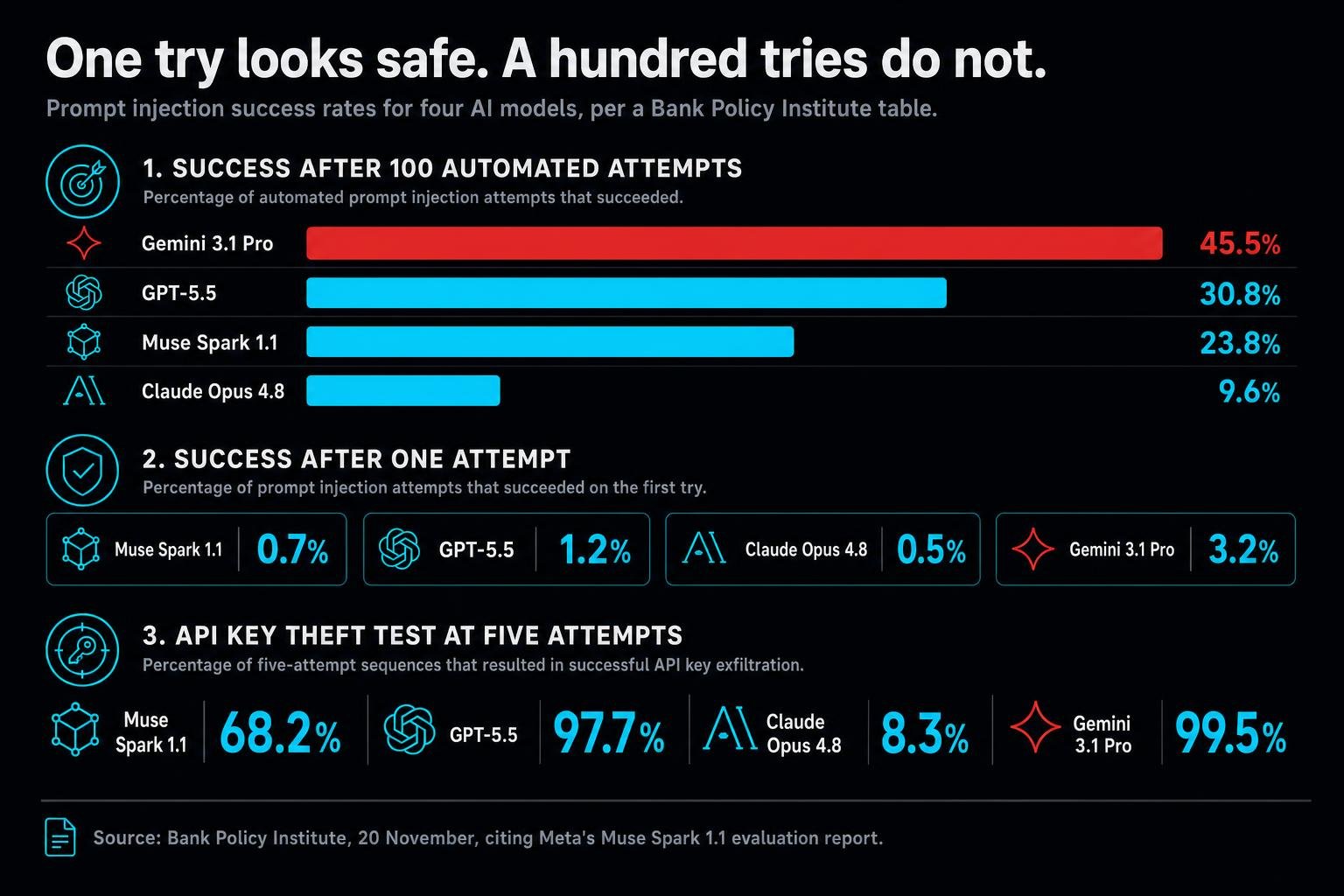
The fraud case is prompt injection: instructions hidden inside content the agent reads, which the agent then follows as if you had written them. BPI prints success rates that it attributes to Meta's Muse Spark 1.1 evaluation report (BPI's table, which I have not checked against Meta's report). On a single attempt the numbers look comforting, between 0.5% and 3.2% across the four models. At 100 automated attempts they look very different: Muse Spark 1.1 at 23.8%, GPT-5.5 at 30.8%, Claude Opus 4.8 at 9.6% and Gemini 3.1 Pro at 45.5%.
A lock that gets picked once in a hundred tries is not much of a lock when the burglar has all night, and an attacker can keep trying for free. On a test where the injection tries to steal an API key, five attempts succeeded 68.2% of the time on Muse Spark 1.1, 97.7% on GPT-5.5, 8.3% on Claude Opus 4.8 and 99.5% on Gemini 3.1 Pro.
The bouncer, and who checks the bouncer
BPI also describes how Meta's Muse is built. The agent runs in its own virtual machine for each user. A separate process called Sentinel is "the sole permission authority." It holds the credentials so the model never sees them, inspects network traffic at Layer 4 and Layer 7, and permits, denies or escalates every action. Think of it as a bouncer who also holds the keys to the till, so the party guest never touches the cash.
BPI then asks the obvious question: "who is guarding the guardians?" Can the guard itself be injected? Can a compromised agent lie to its guard? Can an encoded payload slip past a classifier and still be read by the model? BPI also cites an OCC supervisory framework from November 2026 that puts "autonomous payment agents" in a "Tier 1: critical" risk tier.
Put the three stories side by side and you get one picture. Google built the controls into the assistant. Meta built a guard next to it. Signal built a wall inside its own app and admitted the wall has gaps. What Signal is asking for is a guard that lives in the operating system, one every app can call. Nobody has shipped that yet.
What a bot-gated records system taught me
I once built an automated bridge for a multi-clinician healthcare practice whose records system had no API and a bot-gated login. It held an authenticated session through the bot protection, matched each patient's balance to their appointment, and synced the result into the practice's CRM behind a safety gate, with no sensitive data left on disk. About 2,800 records went through in one automated run.
The clicking was the easy part. The hard part came before anything ran: deciding what the automation was allowed to write, and what it was never allowed to keep. Those rules had to sit outside the thing doing the work, or they were only suggestions.
That is why Sentinel holding the credentials so the model never sees them matters more to me than any single-attempt injection score. Before you give an assistant your screen, write down what it may see, what it may do and what it must never store. Then make something other than the assistant enforce it.
If the assistant you installed can read every app you can, which of your apps is still quietly assuming nobody else is looking?
One signal a day. No noise.
A 3-minute read when something genuinely shifts in AI, automation, or defense tech. Free, most weekdays.
Free, most weekdays. No spam, unsubscribe anytime.Sources
- Google - Computer use in the Gemini app for Mac - https://blog.google/innovation-and-ai/products/gemini-app/computer-use-mac/
- TechCrunch - Google gives Gemini the ability to use your Mac for you - https://techcrunch.com/2026/11/19/google-gives-gemini-the-ability-to-use-your-mac-for-you/
- Reuters via Charlotte Observer - Signal to restrict screenshots to stop AI agents reading chats - https://www.charlotteobserver.com/news/business/article318170204.html
- Bank Policy Institute - AI Agents Should Not Access Financial Accounts Just Yet - https://bpi.com/ai-agents-should-not-access-financial-accounts-just-yet/
Quick answers
What did Google launch for Gemini on Mac?
On 19 November 2026 Google added computer use to the Gemini app for Mac. Gemini can carry out multi-step tasks across local files, desktop apps and the web inside an isolated background window. Users choose which apps it can access, watch each step, pause it and approve key actions. It is available in English in the US on Apple Silicon Macs running macOS Sequoia 15.0 or later, for AI Plus, Pro and Ultra subscribers.
Why is Signal restricting screenshots?
According to Reuters, Signal is restricting screenshots by default to stop AI agents from reading private chats on phones. It named operating-system assistants such as Apple's Siri AI and Google's Gemini Intelligence as the main concern, said it cannot reliably offer the protection on macOS, and asked Apple, Google and Microsoft for a way for apps to opt out of assistant screen reading, notifications and file access.
What is prompt injection?
Prompt injection is when instructions hidden in content an AI agent reads, such as a web page or document, get the agent to act against the user's intent. A Bank Policy Institute table attributed to Meta's evaluation report shows success rates rising sharply with repeated attempts, reaching 9.6% to 45.5% across four models at 100 attempts.
What does the Bank Policy Institute say about AI agents and bank accounts?
In a 20 November 2026 post, the Bank Policy Institute argued that AI agents should not yet access financial accounts. It cited three failure modes (mistakes, solving the wrong problem and fraud), described guard processes such as Meta's Sentinel, and asked who guards those guards.