The 'Don't Ask Again' Click That Leaked 1,122 Repos
Apiiro found database passwords, SSH logins and cloud keys in 1,122 public Claude Code settings files. They got there through one convenience click, and the fix is a habit any team can adopt today.

Almost every AI coding agent has a button that feels like pure relief. The agent asks permission to run a command. You have already approved that same command five times. So you click "Yes, and don't ask again," and the interruptions stop.
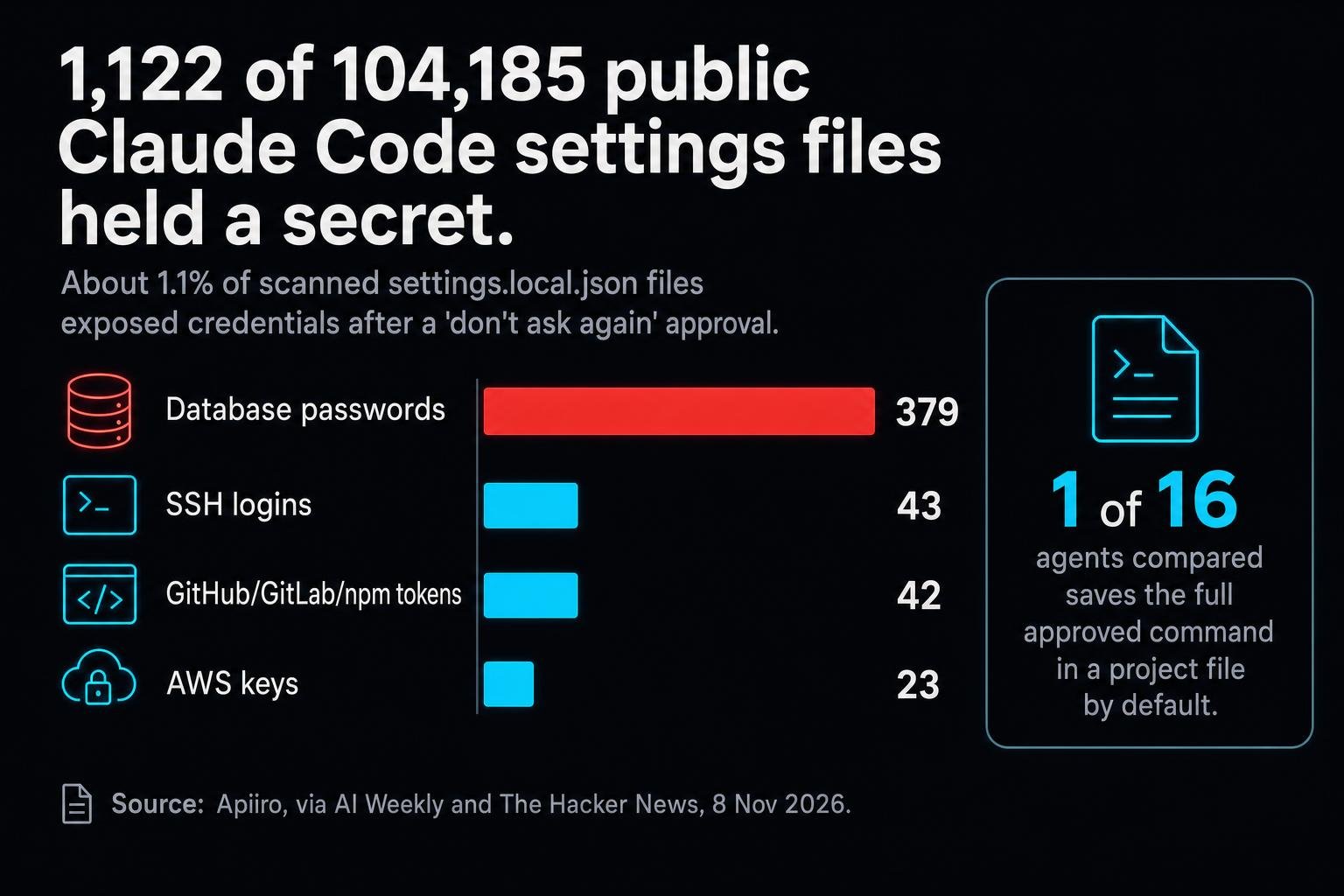
This week security firm Apiiro showed what that click can cost. It scanned 104,185 public copies of a file called .claude/settings.local.json, where Claude Code stores those approvals. It found 1,122 of them, about 1.1%, holding at least one secret. They included 379 database passwords, 43 SSH logins, 42 GitHub, GitLab or npm tokens, and 23 AWS keys.
How a permission turns into a password leak
The mechanism is almost boring, and that is why it is dangerous. When you choose "don't ask again," the tool saves the full approved command as an allow rule. It saves the whole command, not a summary. If you typed a password into that command, for example inside a database connection string, the password now sits in plain text in a project file.
Picture a hotel front desk that wants to save you time on your next visit, so it writes your room key code on the guest card it files. That is helpful until the filing cabinet ends up on the sidewalk. In software, the sidewalk is a public git repository.
Apiiro compared 16 agents and says Claude Code is "the only one confirmed to save the full approved command in a project file by default." It also reports that two widely used secret scanners, gitleaks and TruffleHog, each missed some of the files. And it says four related reports were closed by a bot without a reply.
The most dangerous secrets are not the ones you hide badly. They are the ones you never knew you wrote down.
The fine print cuts both ways
To be fair to Anthropic, its own documentation partly contradicts the claim that this file is "not gitignored by default." The Claude Code settings docs say: "The first time Claude Code writes the file in a git repository that doesn't already ignore it, it adds **/.claude/settings.local.json to your global git excludes file."
So there is a safety net. The problem is where it hangs. It does not cover a settings file that someone created by hand. It also lives in one machine's global git configuration, not in the repository. Clone the same project on a second laptop or a CI runner and that exclude is not there. The net protects the desk where the file was created, not every place the code goes.
That lesson reaches well beyond one tool. A protection that lives on a single machine is a habit, not a policy. Repositories move, people switch laptops, and build machines are often set up fresh. Anything that only works on the original machine will eventually fail somewhere else, and it will fail quietly.
Why this matters beyond developers
If you run a company, you may want to file this under "engineering problem." I would not. AI agents are becoming everyday tools, and the pressure to switch off the prompts is huge, because the whole promise of an agent is that it gets out of your way.
The numbers show where the risk sits. Database passwords are by far the largest group on Apiiro's list, and a database password is often the shortest path to the data a business cares about most. SSH logins and cloud keys open the servers themselves. And because the scanners many teams rely on missed some of these files, "we run secret scanning" does not mean "we are covered."
There is also a process signal. According to Apiiro, four related reports were closed by a bot without a reply. Whatever the reason, it is worth weighing when you decide which tools your team trusts, and how much it matters to you that security reports reach a human.
What good hygiene looks like now
- Put the file in the repository's own .gitignore. Don't rely on a global exclude on one machine. A rule in the repository goes everywhere the code goes.
- Never type a live secret into a command an agent will remember. Use environment variables or a secrets manager, so the approved command holds a reference instead of the value.
- Check your git history, not just your current files. If a settings file was ever committed, the secret stays in history after you delete it. Rotate the credential, because deleting the line is not enough.
- Do not treat one scanner as proof. Apiiro reports that gitleaks and TruffleHog each missed some files. Add an explicit check for this file path.
None of this means giving up on agents. It means treating "don't ask again" like handing someone a spare key. That is fine, as long as you know exactly what is on the key ring and where it ends up.
What a records bridge taught me about disks
I built an automated bridge for a multi-clinician healthcare practice whose records system had no API and a bot-gated login. It holds an authenticated session through the bot protection, matches each patient's balance to their appointment, and syncs the result into the practice's CRM behind a safety gate, with no sensitive data left on disk.
That last part is what matters here. Convenience is where secrets leak. Every saved session, cache or remembered command is a file, and any file can end up somewhere you never meant it to go. Before rolling out any agent, I'd run these checks in this order:
- List every file the tool writes on your behalf.
- Ask which of those files could ever hold a credential.
- Make sure the ignore rule lives in the repository, not on one laptop.
- Rotate anything that was ever committed, then add a check for that path.
One signal a day. No noise.
A 3-minute read when something genuinely shifts in AI, automation, or defense tech. Free, most weekdays.
Free, most weekdays. No spam, unsubscribe anytime.Sources
- AI Weekly: Apiiro finds Claude Code 'don't ask again' leaks keys in 1,122 repos - https://aiweekly.co/alerts/apiiro-claude-code-dont-ask-again-leaks-keys-in-1122-repos
- The Hacker News: Claude Code's 'don't ask again' file - https://thehackernews.com/2026/11/claude-codes-dont-ask-again-file.html
- Anthropic: Claude Code settings documentation - https://code.claude.com/docs/en/settings.md
Quick answers
What did Apiiro find in Claude Code settings files?
Apiiro scanned 104,185 public copies of .claude/settings.local.json and found 1,122, about 1.1%, holding at least one secret. They included 379 database passwords, 43 SSH logins, 42 GitHub, GitLab or npm tokens and 23 AWS keys.
How does 'Yes, and don't ask again' leak secrets?
Choosing it saves the full approved command as an allow rule in a project file. If a password was typed into that command, the password is saved in plain text with it.
Isn't the settings file ignored by git automatically?
Partly. Anthropic's docs say Claude Code adds the file to your global git excludes the first time it writes it in a repository that doesn't already ignore it. That doesn't cover files created by hand, and it lives in one machine's global config, so a clone on another machine or a CI runner has no such exclude.
What should teams do now?
Add the file to each repository's own .gitignore, keep live secrets out of agent-approved commands, check git history for past commits and rotate any exposed credentials. Don't rely on a single secret scanner, since gitleaks and TruffleHog each missed some files.